Metal Bar Weight Calculator
Instantly compute the weight of round, square, hexagonal, and rectangular metal bars. Select from 8 common materials, enter dimensions and length, and get precise mass, weight per meter, cross‑section area, and total weight.
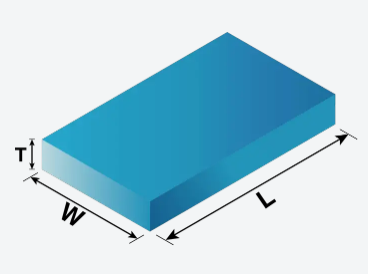
Disclaimer: For reference only. Actual weights vary due to manufacturing/material differences. Consult manufacturer for precise data.
Precision Metal Bar Weight Estimation
The Bar Weight Calculator is an essential engineering tool for fabricators, mechanical engineers, material suppliers, and students. It computes the mass of metal bars based on their shape, material density, and dimensions. Whether you are designing a structural frame, ordering raw material, or estimating shipping costs, accurate weight data is critical for cost estimation, load analysis, and logistical planning.
Weight (kg) = Cross‑section Area (mm²) × Length (m) × Density (g/cm³) / 1000
For round bars: Area = π × (d/2)² | Square: Area = a² | Hex: Area = (3√3/2) × a² | Rect: Area = w × h
Why Use an Interactive Bar Weight Calculator?
- Rapid Estimation: Instantly get weight for any combination of shape, material, and size — no need to look up density tables or perform manual area calculations.
- Visual Feedback: The interactive chart shows how weight changes with length, helping you select the optimal bar length for your project.
- Material Selection: Compare weights across different materials (steel vs. aluminum vs. titanium) to balance strength, weight, and cost.
- Educational Value: Understand the relationship between cross‑section geometry, density, and mass through real‑time computation and visualization.
- Engineering & Manufacturing: Use in structural design, CNC machining, 3D printing filament estimation, and shipping weight calculations.
Formulas & Derivation
The weight of a bar is computed from its volume and material density. For a prismatic bar with constant cross‑section, the volume is simply Area × Length. The mass is then Volume × Density. Since density is typically given in g/cm³ and area in mm², we apply the conversion factor 1/1000 to obtain mass in kilograms.
Round bar: Area = π × (d/2)² → Weight = π × (d/2)² × L × ρ / 1000 (kg), with d in mm, L in m, ρ in g/cm³.
Square bar: Area = a² → Weight = a² × L × ρ / 1000.
Hexagonal bar: Area = (3√3/2) × a² → Weight = (3√3/2) × a² × L × ρ / 1000.
Rectangular bar: Area = w × h → Weight = w × h × L × ρ / 1000.
The weight per meter is obtained by setting L = 1 m. This value is especially useful for quoting material prices, as many suppliers list prices per kilogram or per meter.
Material Density Reference Table
Accurate density values are the foundation of precise weight estimation. The table below lists densities of commonly used metals at room temperature (20 °C). Slight variations may occur due to alloy composition and manufacturing processes.
| Material | Density (g/cm³) | Density (kg/m³) | Typical Applications |
|---|---|---|---|
| Steel (mild) | 7.85 | 7,850 | Structural, automotive, machinery |
| Stainless Steel (304) | 7.90 | 7,900 | Food processing, medical, architecture |
| Aluminum (6061) | 2.70 | 2,700 | Aerospace, automotive, consumer goods |
| Copper | 8.96 | 8,960 | Electrical, plumbing, heat exchangers |
| Brass (C360) | 8.50 | 8,500 | Fittings, valves, decorative hardware |
| Titanium (Grade 5) | 4.50 | 4,500 | Aerospace, medical implants, marine |
| Bronze (C932) | 8.80 | 8,800 | Bearings, bushings, marine hardware |
| Cast Iron | 7.20 | 7,200 | Engine blocks, pipes, machine bases |
Values are nominal. Always verify with material data sheets for critical applications.
Step‑by‑Step Usage Guide
- Select the bar shape (Round, Square, Hexagonal, or Rectangular).
- Choose the material from the dropdown — density updates automatically.
- Enter the primary dimension (diameter, side, width, or height). For rectangular bars, also enter the second dimension (height).
- Specify the length in meters and the quantity of bars.
- Click Calculate Weight — results appear instantly, along with an interactive chart.
- Use the preset examples to quickly explore common bar configurations.
Real‑World Applications
Case Study: Structural Steel Ordering
A construction firm needs to order 50 round steel bars, each 6 meters long with a diameter of 25 mm. Using the calculator: Area = π × (12.5)² = 490.87 mm², weight per meter = 490.87 × 7.85 / 1000 = 3.85 kg/m, per bar = 3.85 × 6 = 23.1 kg, total = 50 × 23.1 = 1,155 kg. This data allows the firm to accurately estimate shipping costs and crane load requirements.
Case Study: Aerospace Weight Optimization
An aerospace engineer compares aluminum and titanium for a structural spar. A rectangular bar 80×20 mm, 2.5 m long: Aluminum weight = 80×20×2.5×2.70/1000 = 10.8 kg; Titanium weight = 80×20×2.5×4.50/1000 = 18.0 kg. While titanium is 67% heavier, it offers superior strength‑to‑weight ratio. The calculator enables rapid trade‑off analysis during the design phase.
Common Misconceptions
- "Weight depends only on length" — False. Weight is a function of cross‑section area, length, and density. A thick short bar can weigh more than a long thin bar.
- "All steels have the same density" — Not exactly. While most carbon steels are close to 7.85 g/cm³, stainless steel and alloy steels can vary (7.7–8.1 g/cm³).
- "Density is constant with temperature" — Density decreases slightly as temperature increases due to thermal expansion. For most engineering calculations at ambient conditions, the variation is negligible (<1%).
- "Hexagonal bar area is same as square" — No. A hexagon with side length a has area (3√3/2)·a² ≈ 2.598·a², while a square with side a has area a². The hex bar is more material‑efficient for a given circumscribed circle.
Expert Tips for Accurate Estimation
- Use precise dimensions: Measure diameter or side length with calipers. Even 0.1 mm variation can affect weight by 1–2% for small bars.
- Account for tolerances: Manufactured bars often have dimensional tolerances (e.g., ±0.5 mm). Consider using nominal dimensions for estimation and actual dimensions for critical calculations.
- Check material grade: Density can vary with alloy composition. For critical applications, refer to the material data sheet for accurate density.
- Consider surface finish: Coatings, plating, or surface treatments add negligible weight (typically <0.5%) but may be relevant for precision components.